Best EU-compliant office suites
Summary
ONLYOFFICE Docs stands out as one of the best EU-compliant office suites due to its strong focus on data sovereignty, GDPR compliance, and flexible deployment options. Developed by a company registered in the EU, it offers self-hosting capabilities, an open-source architecture, and robust compatibility with Microsoft Office formats, making it an ideal choice for organizations that prioritize control over their data and compliance with European regulations.
- ONLYOFFICE Docs is fully GDPR compliant.
- It allows self-hosting for data control.
- The suite supports open document formats.
- It offers native compatibility with Microsoft formats.
- Real-time collaboration features enhance productivity.
Data sovereignty has moved from a niche IT concern to a boardroom priority. As European organizations face tightening regulations and growing scrutiny of where sensitive data physically resides and who can access it, choosing an office solution is no longer just about features and price. It’s about control, compliance, and long-term trust.
This guide looks at some of the leading office suites, evaluating them specifically through the lens of EU compliance.

What does “EU-compliant” mean? The regulatory backdrop
Understanding why EU-compliant matters requires a quick look at the regulatory framework shaping European IT decisions today.
The General Data Protection Regulation (GDPR), in force since 2018, remains the cornerstone of European data protection law. It governs how personal data is collected, processed, and stored, and gives individuals strong rights over their own information — including the right to know exactly where their data resides and who can access it.
More recently, the NIS2 Directive has expanded cybersecurity obligations to a much broader range of organizations, including many in the public sector, healthcare, energy, and digital infrastructure. NIS2 requires stricter risk management practices and incident reporting, which in turn puts pressure on organizations to understand and document the full software supply chain behind their critical tools — including office productivity software, which routinely handles sensitive internal communications and documents.
At the same time, ongoing discussions around digital sovereignty and initiatives like the EU’s push for a “Digital Markets Act” ecosystem and various national “cloud sovereignty” programs reflect a broader political will to reduce dependency on non-European software providers for critical infrastructure. While none of these frameworks mandate a specific vendor or product, they collectively raise the bar for what “compliance” means in practice: it’s no longer just about ticking a legal box, but about demonstrable control over data location, processing, and access.
 Vectorelements on unsplash.com
For IT decision-makers, this means evaluating office software is increasingly a governance question as much as a technical one — and one that benefits from documentation, auditability, and architectural choices that hold up under regulatory scrutiny.
8 Essential requirements for an EU-compliant office suite
GDPR compliance. Look for a clear Data Processing Agreement, privacy-by-design architecture, granular user permissions, and audit trails.
Data residency and sovereignty. The ability to self-host or choose EU-based infrastructure matters more than a privacy policy — jurisdiction determines who can ultimately compel access to data.
Enterprise security. Encryption at rest and in transit, MFA, SSO, and audit logs are the baseline. The NIS2 Directive has pushed these from optional to expected for a growing range of organizations.
Flexible deployment. Cloud, on-premises, and hybrid options should all be on the table, without forcing a trade-off between convenience and control.
Open document formats. Support for DOCX, XLSX, PPTX, ODF, and PDF/A protects against vendor lock-in and keeps documents accessible over time.
Accessibility. Keyboard navigation, screen reader compatibility, and accessible PDF output are increasingly a legal requirement for public institutions, not just good practice.
AI compliance. AI features should come with clear disclosure of how content is processed, meaningful opt-out controls, and explicit guarantees that documents aren’t used for model training.
Integrations and interoperability. LDAP, Active Directory, ownCloud, SharePoint compatibility, and a documented API determine how well the suite fits into existing infrastructure without forcing a wider migration.
Best EU-compliant office suites
With these criteria in mind, here’s how some of the leading solutions on the market compare.
1. ONLYOFFICE Docs
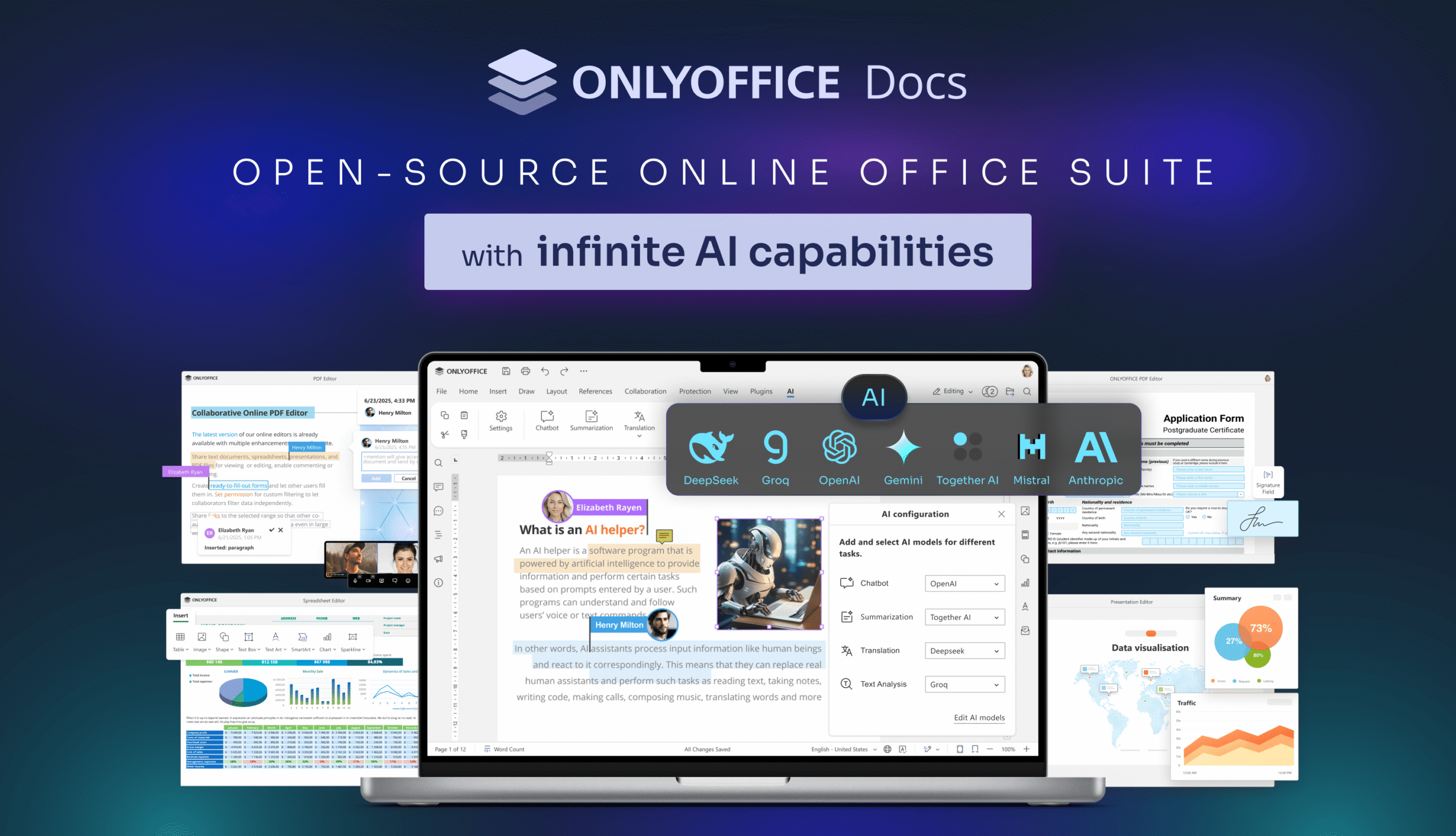
ONLYOFFICE Docs is a powerful office suite offering a full range of editors — documents, spreadsheets, presentations, PDFs, and fillable forms — with real-time collaboration, advanced formatting, and deep compatibility with Office formats. Developed by Ascensio System SIA, a company registered in Riga, Latvia, whose intellectual property and core operations sit within EU jurisdiction, it combines a fully open-source editing core with flexible deployment options — cloud, on-premises, or private cloud — making it a great sovereignty-friendly solution.
Strengths:
- Full on-premises and private cloud deployment, with no mandatory dependency on vendor infrastructure.
- Open-source under AGPL v3, allowing independent security audits.
- EU-registered legal entity directly subject to GDPR, with a corporate structure that keeps IP and licensing within EU law.
- Native compatibility with .docx, .xlsx, and .pptx, minimizing migration friction.
- Integration with a range of European cloud providers for a fully sovereign stack.
Considerations:
- Self-hosted deployment requires in-house technical capacity or a trusted implementation partner.
- The wider corporate group spans multiple jurisdictions, which some compliance teams may want to examine in detail.
For public sector institutions, healthcare organizations, and businesses where data control is non-negotiable, ONLYOFFICE’s combination of self-hosting, open-source transparency, and EU-registered entity makes it a particularly strong starting point. Read our blog to learn about success stories.
2. Collabora Online
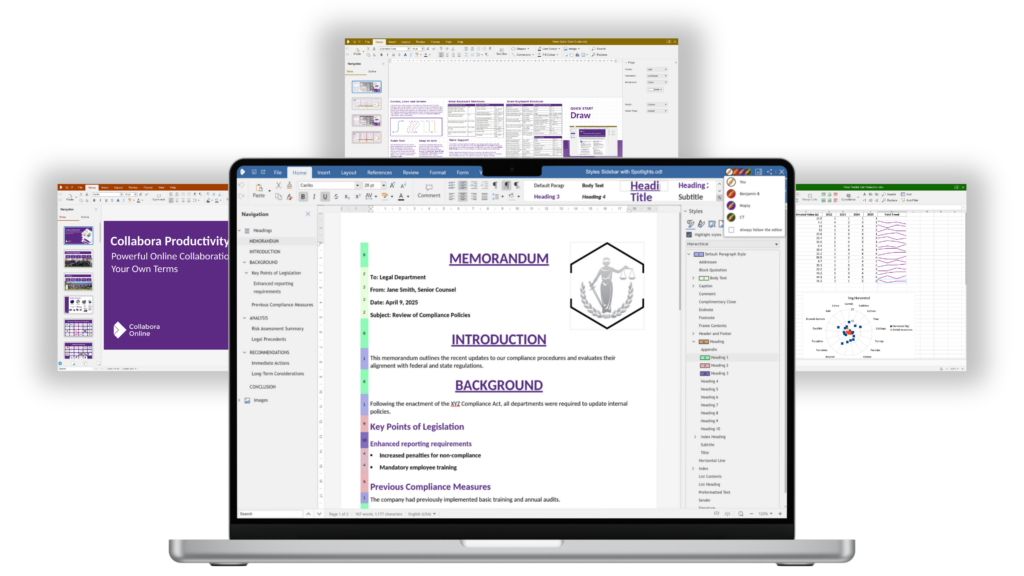 Image source: collaboraonline.com
Collabora Online is built by Collabora Productivity on top of the LibreOffice engine, packaging it as a browser-based collaborative editing platform. It has a strong track record of public-sector adoption across Europe and is a natural fit for organizations already running open-source infrastructure.
Strengths:
- Open-source, with complete code transparency and independent auditability.
- Self-hosted on-premises or in a private cloud, with full data location control.
- Well-established integrations with ownCloud and a range of groupware platforms.
- Available in a free Community Edition (CODE) as well as paid enterprise tiers with SLAs and support.
Considerations:
- Formatting compatibility with complex Microsoft Office files can still vary — worth testing before large-scale migration.
- The interface is less polished than commercial alternatives, which may increase user adoption resistance.
- Self-hosted setup requires meaningful in-house IT capacity.
Collabora is a solid choice for organizations that need real-time collaboration with full infrastructure control, especially those already invested in the open-source ecosystem.
3. LibreOffice
 Image source: libreoffice.org
LibreOffice is an established open-source office suite on the market, developed by The Document Foundation, a non-profit based in Berlin. It emerged in 2010 and has since becomeone of the most widely deployed desktop office suites in European public institutions, with notable adoption in French, German, and Italian government bodies.
Strengths:
- Completely free and open-source, with no licensing fees regardless of organization size.
- Inherently sovereign by design — no vendor server, no cloud dependency, no data leaving the device.
- Backed by a European non-profit with a transparent, community-driven governance model.
- Covers documents, spreadsheets, presentations, databases, and vector drawing, with strong offline and air-gapped support.
Considerations:
- Primarily a desktop application; real-time collaboration requires a separate server component such as Collabora Online.
- Compatibility with complex Microsoft Office files can introduce formatting shifts, particularly with macros or advanced layouts.
- Enterprise support relies on a network of third-party vendors rather than a single provider, which can complicate procurement.
LibreOffice is an excellent foundation for organizations prioritizing zero-cost, fully offline software — particularly when built-in collaboration isn’t a hard requirement.
4. SoftMaker Office
 Image source: softmaker.com
SoftMaker Office is developed by SoftMaker Software GmbH, a company headquartered in Nuremberg, Germany, with a history stretching back to 1987. It is a commercial desktop office suite covering documents, spreadsheets, and presentations, built with an explicit focus on GDPR compliance and local data processing.
Strengths:
- German-headquartered company operating entirely under EU law, with no extraterritorial jurisdiction concerns.
- Documents are processed locally with no data sent to external servers, making it inherently privacy-friendly by architecture.
- Native compatibility with .docx, .xlsx, and .pptx, with a high-fidelity rendering that competes well with Microsoft Office.
- Available on Windows, macOS, Linux, Android, and iOS, with consistent feature parity across platforms.
Considerations:
- Closed-source, so data handling cannot be independently verified at code level.
- Primarily a desktop application with limited real-time collaborative editing capabilities compared to browser-based solutions.
- No self-hosted server deployment option for organizations needing centralized document management.
5. Etherpad
 Image source: etherpad.org
Etherpad is an open-source collaborative editor that enables multiple users to work on the same document in real time. Originally developed as a web-based writing platform, it has become a popular choice for organizations seeking a lightweight, self-hosted collaboration tool with full control over their data.
Strengths:
- Fully open-source and independently auditable.
- Self-hosted deployment with complete control over data location and access.
- Lightweight architecture with minimal infrastructure requirements.
- Real-time collaboration capabilities with instant synchronization.
Considerations:
- Focused primarily on collaborative text editing rather than providing a complete office suite.
- Limited support for advanced document formatting and office file formats.
- Does not include native spreadsheet or presentation editors.
At a glance
| Solution | Self-hosted | Open Source | GDPR-friendly | Data Sovereignity | MS Format Compatibility | APIs | Real-time Collaboration |
|---|---|---|---|---|---|---|---|
| ONLYOFFICE | Yes | Yes (AGPL v3) | Yes | Yes | Native | Yes | Yes |
| Collabora Online | Yes | Yes | Yes | Yes | Good | Limited | Yes |
| LibreOffice | Yes (desktop) | Yes | Yes | Yes | Good | Limited | Requires add-on |
| SoftMaker Office | No (desktop only) | No | Yes | Yes | Native | No | Limited |
| Etherpad | Yes | Yes | Yes | Yes | Limited | Yes | Yes |
Why ONLYOFFICE stands out
What sets ONLYOFFICE apart in this landscape is less about any single feature and more about architectural choices: self-hosting as a first-class deployment option, an open-source codebase that can be independently audited, and an EU-registered legal entity that places the product squarely within European jurisdiction. For organizations where these factors are genuinely decisive, they’re difficult to find in combination elsewhere. Full details on its security architecture are available on the ONLYOFFICE security page.
Mapped against the eight requirements above, the picture looks like this:
| Requirement | ONLYOFFICE |
|---|---|
| GDPR | Yes |
| Self-hosted | Yes |
| Data residency | Yes |
| Open formats | Yes |
| Microsoft compatibility | Yes |
| Enterprise security | Yes |
| APIs | Yes |
| Real-time collaboration | Yes |
The right choice ultimately depends on an organization’s risk tolerance, infrastructure, and regulatory obligations. But for those where compliance needs to be built into the architecture itself — not configured around it — ONLYOFFICE is a strong place to start.
Get ONLYOFFICE Docs right now
Explore a secure and flexible office suite built for organizations that value compliance, control, and interoperability.
Create your free ONLYOFFICE account
View, edit and collaborate on docs, sheets, slides, forms, and PDF files online.


